Toggle Fields
Input Mode
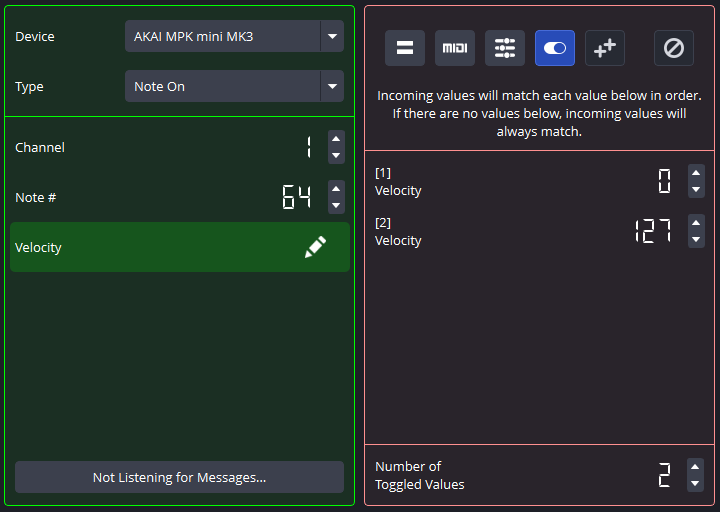
When working with an input  (Toggle) Field, the plugin will provide you with a list of values to edit. When checking for Binding fulfillment, the plugin will detect which value was last used for fulfillment and check the next one in the list. If the checked value does not match the incoming value, the Binding will not be fulfilled.
The plugin will NOT advance to the next toggled value upon failure - only when it is successful will it do this. Additionally, upon reaching the end of the list, the plugin will loop back around to the beginning of the list and start the process over again.
For example, in the Message above, the first time the Binding is fulfilled, the Velocity Field in the incoming MIDI message must be 0. But the second time it is fulfilled, the Velocity Field in the incoming MIDI message must be 127.
You can adjust the number of values to toggle at the bottom of the editor screen. You can use up to 16 such values.
For Fields that toggle between ON and OFF states: This Field will always match an incoming value, no matter which state the Field is in.
Output Mode
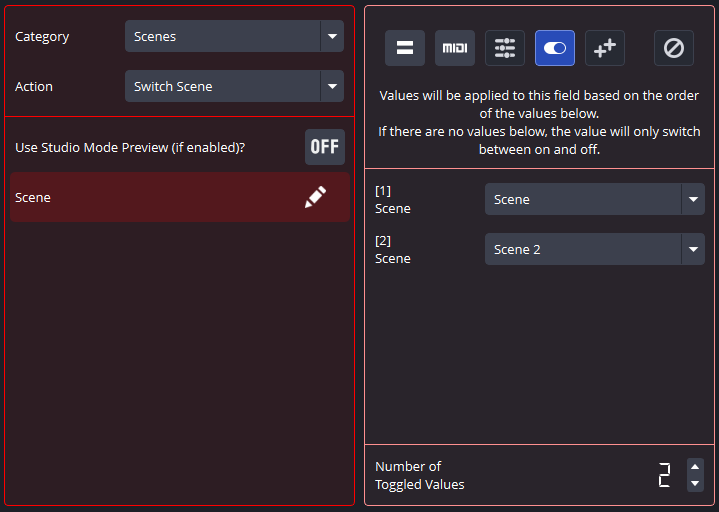
When working with an output (Toggle) Field, the plugin will set the associated Field to the provided value based on the value last used, just like in the input Toggle Field.
Once again, upon reaching the end of the list, the plugin will loop back around to the beginning of the list and start the process over again.
You can adjust the number of values to toggle at the bottom of the editor screen. You can use up to 16 such values.
For example, in the Action above, the Scene Field indicates that the first time the Binding is fulfilled, the scene will be switched to Scene, and on the second fulfillment it will be switched to Scene 2.
For Fields that toggle between ON and OFF states: This Field will always toggle the output Field to the opposite state.
The plugin will remember what the last fulfilled value was in any toggle Field EVEN AFTER OBS STUDIO IS CLOSED AND REOPENED!