Range Fields
This Field mode only applies to numeric Field types. It will not be available for other types of Fields.
Input Mode
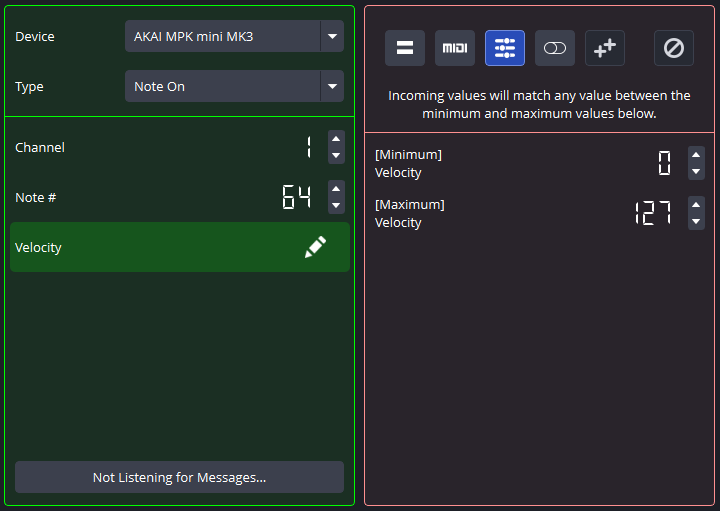
When working with an input  (Range) Field, the plugin will provide you with a minimum value and a maximum value, typically at the extent of the physical or software limitations of the Field. When checking for Binding fulfillment, the plugin will detect if the incoming value falls between these two values (inclusive). If not, the Binding will not be fulfilled.
For example, in the Message above, the Velocity Field in the incoming MIDI message must be between 0 and 127 (inclusive) for the Binding to be fulfilled. This just so happens to include all possible Velocity values that a MIDI (1.0) message is able to hold.
An input Range Field is required in a Binding to use output Range Fields.
Output Mode
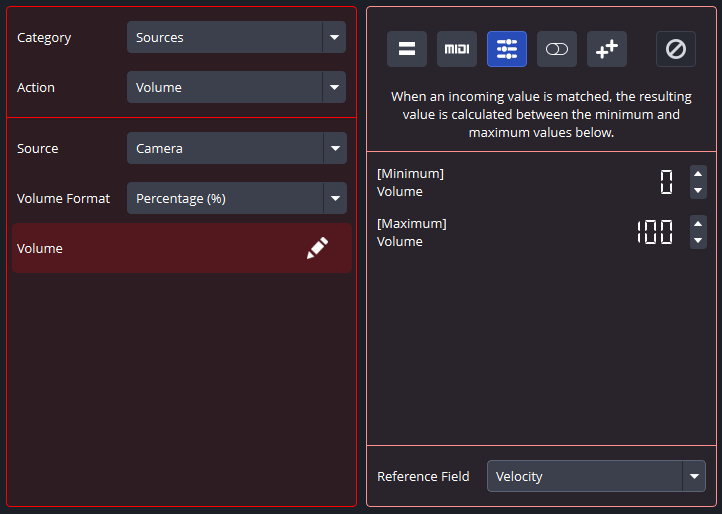
When working with an output (Range) Field, the plugin will set the associated Field to the provided value based on the result and the result ratio of the Reference input field. This mode is very useful for MIDI faders and sliders, as it can map a fader or slider to just about anything numeric within OBS Studio.
Once again, a Reference input field is just an input field from the same Binding that you can use to associate those input Field values with output Field values. However, incoming values do not map one-to-one with output Range Fields. Output Range Fields use the result ratio of the incoming value with respect to the input Range field to determine what value to set.
Once again, you can only use this output Field mode when an input Range Field exists in the same Binding. The Binding will always fail if there are output Range Fields and no input Range Fields simultaneously.
For example, in the Action above, the Volume Field indicates that the volume of the Camera source will be set to a value between 0% and 100% depending on the incoming value of the Velocity reference input Field.
A result ratio example: If your input Range field is set to a minimum of 25 and a maximum of 75, and your Binding is fulfilled with an incoming value in that Field of 50, the result ratio of the incoming value is 0.5 because it is halfway between 25 and 75. The output Range Field will use that 0.5 and convert it into the same ratio using its own minimum and maximum. So if your output Range Field has a minimum of 0 and a maximum of 2500, the output Range Field will be set to 1250.