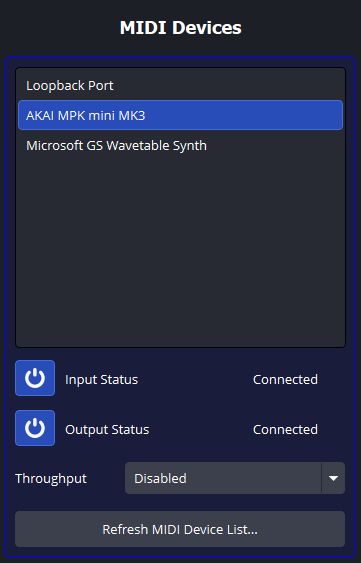
MIDI devices provide the basis for the plugin - without them, this plugin would not function. In the plugin, MIDI devices can be controlled for both input and output to interact with OBS Studio. To use them, they must be Connected, otherwise no activity will occur in the plugin.
When the plugin indicates a MIDI device is Disconnected, this means the plugin detects the MIDI device, but will never interact with it. The plugin will indicate a MIDI device to be Unavailable for both Input and Output if the plugin cannot find the MIDI device at all.
Clicking the  buttons will enable the plugin to interact with the selected MIDI device. If the plugin succeeds in connecting to the MIDI device, the status will update to Connected. If not, the status will remain Disconnected and a popup will appear indicating a problem. If the status reads Unavailable, this means the device does not support that type of connection.
If the plugin fails to connect to a device, try unplugging it and plugging it back in. This resolves most of the connection problems this plugin can have.
MIDI devices can also serve as throughputs to other MIDI devices using this plugin. If a throughput device is selected, all MIDI traffic coming from the Input side of the device will automatically be sent to the Output side of the selected throughput device (as long as the Output side of the throughput device is Connected).
This MIDI device list can be manually refreshed by clicking the Refresh button.
MIDI devices will appear or disappear based on if the device is physically connected to the host device (i.e. the device running OBS Studio). If you plug in a MIDI device while the plugin is running, it should appear automatically.
Although not pictured above, a  button will appear beside the Refresh button if a MIDI Device is completely Unavailable. When clicked, the plugin will remove the selected MIDI Device from the list, and it cannot be recovered unless the MIDI device is detected again. In some cases, the plugin may require a reboot to detect a device that was removed (mainly on Windows).