Fixed Fields
Input Mode
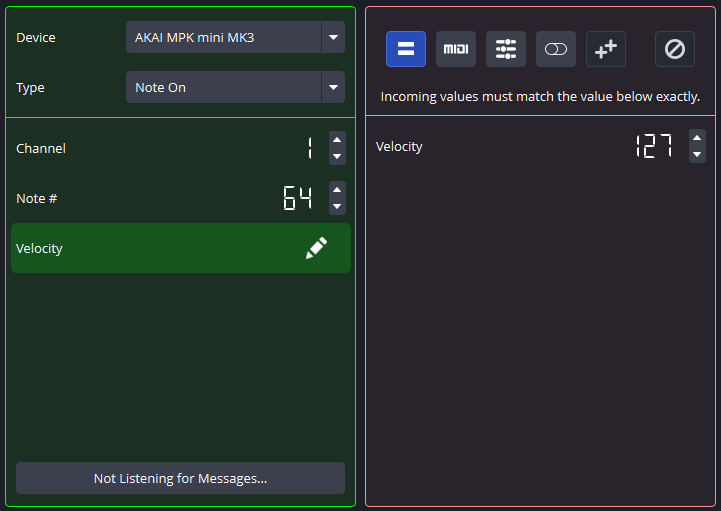
When working with an input  (Fixed) Field, the plugin will use the provided value as a required condition for the Binding to be fulfilled.
For example, in the Message above, the Velocity Field in the incoming MIDI message must match 127 for the Binding to be fulfilled.
This is the default Field mode, and will be displayed in the Message editor without entering the Field editor screen. In the Message above, all the Fields are in Fixed mode, meaning the Binding will only be fulfilled if all those Fields match exactly.
Output Mode
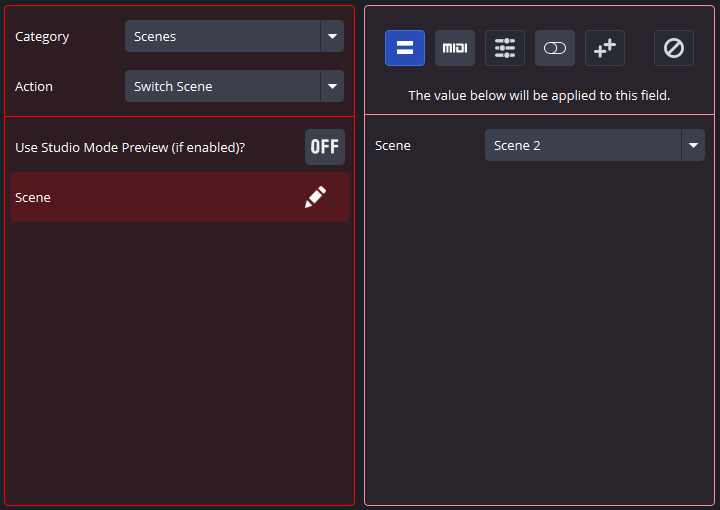
When working with an output (Fixed) Field, the plugin will set the associated Field to the provided value.
For example, in the Action above, the Scene Field indicates that the current scene will be switched to Scene 2 upon Binding fulfillment.